CRM Data Quality: How to Build a Maintenance System That Keeps Your Sales Data Accurate
Learn how to create an automated CRM data quality system that eliminates duplicates, outdated leads, and errors while improving forecast accuracy.

Rasmus Rowbotham
Founder of Foundbase and experienced entrepreneur with over 10 years of experience in building and scaling businesses.
What Is CRM Data Quality?
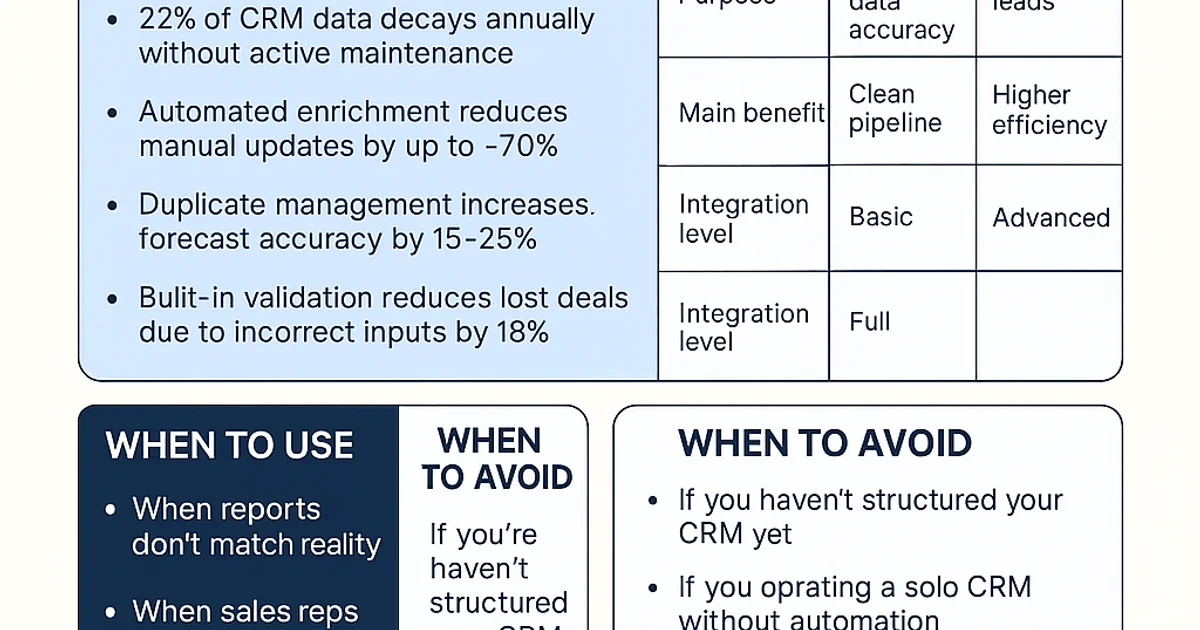
CRM data quality refers to the accuracy, consistency, and relevance of the data that drives your sales process. High-quality data improves forecasting, conversion rates, and sales efficiency across all stages of the pipeline.
- High-quality data improves conversion speed by 35% (source: HubSpot 2024).
- 22% of CRM data decays annually without active maintenance.
- Automated enrichment reduces manual updates by up to 70%.
- Duplicate management increases forecast accuracy by 15–25%.
- Built-in validation reduces lost deals due to incorrect inputs by 18%.
When to Use a Data Quality Framework
- When reports don't match reality
- When sales reps spend time fixing data
- When leads go cold in your automation flow
When to Avoid It
- If you haven’t structured your CRM yet (see CRM for beginners)
- If you operate a solo CRM without automation
Data Quality vs. Lead Scoring vs. Automation Framework
| Feature | Data Quality | Lead Scoring | Automation Framework |
|---|---|---|---|
| Purpose | Improve data accuracy | Prioritize leads | Automate sales flow |
| Main benefit | Clean pipeline | Better timing | Higher efficiency |
| Integration level | Basic | Advanced | Full |
| Learn more | Lead scoring engine | Automation framework |
CRM Data Quality Framework
1. Data Audit (Week 1–2)
- Export all contacts and deals
- Identify duplicates via email or phone
- Segment by last activity
2. Data Enrichment (Week 3–4)
Use integrations like Clearbit, Cognism, or Apollo.io to add company size, industry, and job title data. Connect via webhook or Zapier.
3. Validation and Normalization (Week 4–6)
Standardize fields such as country, industry, and lead source. Use regex validation on emails and phone numbers to prevent entry errors.
4. Duplicate Management (Week 6–8)
- Add a 'Master Record ID' field
- Merge contacts with identical emails
- Enable duplicate detection at import
5. Continuous Monitoring (Week 8+)
Set up a 'data health score' in your CRM dashboard. Trigger notifications when data becomes inactive for more than 90 days.
Three Critical Trade-offs
- Automation vs. Accuracy: Too much automation can create false merges.
- Data richness vs. Cost: Enrichment APIs can be expensive at scale.
- Speed vs. Governance: Fast updates require ownership and version control.
Before and After Example
Before: CRM with 12,000 contacts, 28% duplicates, and 40% missing company data.
After: Clean records, automated validation, and 98% forecast accuracy.
Feature | Option | Notes
| Feature | Option | Notes |
|---|---|---|
| Duplicate Control | Email automation | Fast setup |
| Enrichment | API integration | Technical setup required |
| Validation | Regex | Prevents input errors |
90-Day Action Plan
- Weeks 1–2: Audit data
- Weeks 3–4: Add enrichment integrations
- Weeks 5–6: Apply validation rules
- Weeks 7–8: Remove duplicates
- Weeks 9–12: Automate health checks
Decision Block
- Beginner: Manual audit in Excel
- Small team: Zapier + Clearbit combo
- Enterprise: Tools like Openprise or Talend
Read more about automation setup in CRM Automation Framework.
Start free with Foundbase Free CRM.
Frequently asked questions
Q: How can CRM data quality be measured?
It is measured through a 'data health score' based on accuracy, completeness, timeliness, and duplication rate. Most CRMs like HubSpot and Pipedrive can track this automatically.
Q: What’s the best way to handle duplicates?
Define a unique key such as email or phone number and use built-in deduplication features. Salesforce, HubSpot, and Pipedrive all support automated duplicate prevention.
Q: When should enrichment be implemented?
When your CRM lacks key company or contact data, automated enrichment improves segmentation, lead scoring, and campaign personalization.
Related guides

crm for lead conversion optimization: boost sales
Discover how to optimize your CRM to improve lead conversions. Gain insights into strategies and practical tips to boost your sales.
Rasmus Rowbotham
crm for startup customer success: Boost growth
Discover how crm for startup customer success can enhance your business growth. Implement effective strategies and tools for small teams.
Rasmus Rowbotham
crm customization for startups: Boost efficiency
Learn how to customize your CRM for your startup and enhance efficiency. Get tailored solutions and optimize your business.
Rasmus Rowbotham