
How to Automate Your Business with AI
Learn to choose business processes to automate, use AI with human review and introduce workflows step by step, with practical examples for small business teams.
 Rasmus Rowbotham 15 min read Updated October 19, 2026
Editorially reviewed: Reviewed for relevance, internal links, product features and search intent.
Contents
- Quick answer
- What does workflow automation mean?
- Where can AI help, and where should a person stay involved?
- Map the process as it actually happens
- Choose a first workflow with a simple priority check
- Example: from a new enquiry to a personal follow-up
- Two examples from small teams
- Other workflows worth exploring
- How do you choose between AI, rules and integrations?
- What workflow automation looks like in Foundbase
- A practical four-week rollout
- What does automation cost?
- Measure whether the work improved, not only whether the workflow ran
- Avoid these workflow automation mistakes
- Checklist before turning an automation on
- Build one clear workflow at a time
- Frequently asked questions
Best fit for
- Teams that want structure around workflow automation without unnecessary complexity
- Businesses that want customers, tasks and agreements in fewer systems
- Service companies and agencies with client projects
Not the best fit for
- Large enterprise setups with dedicated specialist tools per department
- Teams that only need one narrow module and never connect sales and delivery
- Organisations with a mature, expensive integrated setup they will not change
Foundbase brings CRM, project management, tasks, contracts, budget and automation into one workspace. You can get started with CRM and task management for free on Foundbase Free with no credit card (1 user included, additional users can be added), and add finance, contracts, workflows and integrations as needs grow.
What does workflow automation mean?
Workflow automation means that a recurring event starts an agreed action. A new lead, for example, can create a follow-up task. A workflow usually has a trigger, optional conditions and an action. That makes it different from a checklist where someone manually completes and marks every step.
AI can help describe a workflow, summarize information or suggest a next action. It should not automatically take over every judgement. A sound process makes clear what the system does, what a person needs to check, and how exceptions are handled.
Where can AI help, and where should a person stay involved?
AI is useful when a task involves language or pattern recognition: summarizing a long email thread, sorting an enquiry into a category or drafting a first reply. Those suggestions should be visible and easy to correct, especially when they rely on incomplete information.
Ordinary rules are often better when the process is fixed and the outcome can be described precisely. “When a deal moves to Won, create a delivery task” is a rule. “Decide whether this customer is valuable and give them the right treatment” requires context and judgement; it should not be buried in vague automation.
Good AI candidate: summarize, categorize or suggest wording that a person can review.
Good rules candidate: repeat a clear action after a well-defined event.
Keep human control: decisions with financial, legal or significant consequences, and messages that commit the business.
The best solution may combine both: AI prepares a suggestion, and an employee approves it before it is sent or changes an important record.
Three levels from manual support to automatic rules
It helps to distinguish three levels. At the first level, the team uses a digital tool but chooses and completes every step. At the next level, AI suggests a category, summary or draft that a person checks. At the third level, a fixed rule starts an action without someone initiating it manually. All three levels can exist in one workflow.
Choose the lowest level that solves the problem. If a checklist removes uncertainty, that may be enough. If an AI summary saves reading time while leaving the decision to an employee, it is a bounded AI use case. If a stable event should always start the same task, a rule may fit better than a generative model.
Also ask who would notice an error. In a manual step, an employee often sees the task while doing it. In an AI suggestion, the error may be in the text. In an automatic action, it can continue until someone notices the result. More automation does not always require less control; sometimes it requires clearer checkpoints.
Map the process as it actually happens
Write the workflow from the first event to completion. Use concrete verbs: receive, check, create, assign, send, approve and close. Note who owns each step, what information the next person needs and where the team currently looks for status.
Talk to the people who do the work. A process diagram written by management may miss the small workarounds employees use to get through the day. Look for places where someone copies data, rewrites the same message or asks a colleague whether a case is ready.
A simple process map does not need a large diagram. Answer these questions on one page:
What starts the process, and how do we know it has started?
Which record or information needs to be updated?
Who owns the next step, and how will they know about it?
Which conditions change the path?
What happens when data is missing or a case falls outside the usual pattern?
How do we know the work is complete?
If the team cannot answer those questions consistently, the process is not ready for full automation. Agree on a shared manual way of working first. Once it works, it becomes easier to see which step a rule can take over.
Signs that a process is ready
A process is easier to automate when the team uses the same statuses, fields have shared meanings, the next owner is clear, and a standard case does not change from person to person. The documentation does not need to be perfect. Employees should be able to explain the main steps without guessing what a colleague usually does.
If data is often missing, first find out why. Another required field may help, but it may also make it harder to create a record. Perhaps the form needs work, or a step needs to move earlier in the process. Automating poor data quality usually moves the error along faster; it does not fix the cause.
The same applies to integrations. If two systems have separate statuses or contact records, decide which system owns the information and what may be synchronized. Do not build the workflow until you know whether the connection is active and supports the required direction.
Choose a first workflow with a simple priority check
Start with one process that happens often, follows the same steps and has a clear owner. Assess four things: how often it happens, how much manual work it requires, how similar the cases are, and what an error would mean. A small, frequent task with low risk is usually a better first pilot than a rare process with several approvals.
Describe the exceptions too. If almost every case needs a special judgement, a rule may not save time. If most follow the same path but a few differ, the workflow can handle the standard cases and send the rest to a person.
Avoid promising savings before measuring them. Note how long the task takes now, how often it is missed and how much rework errors create. After a pilot, compare on the same basis and decide whether the change helped.
Example: from a new enquiry to a personal follow-up
Imagine a business receiving leads from a form. Today, an employee may copy the name and email into CRM, send an internal message and remember to follow up later. Every manual hand-off is another place where an enquiry can be missed.
First make the process clear: the lead is created, an owner receives a follow-up task, and the employee reviews the enquiry before sending a personal reply. A workflow can help with repeated steps when the available trigger, conditions and action fit your setup. AI might suggest a draft, but the employee should check tone, facts and promises before sending it.
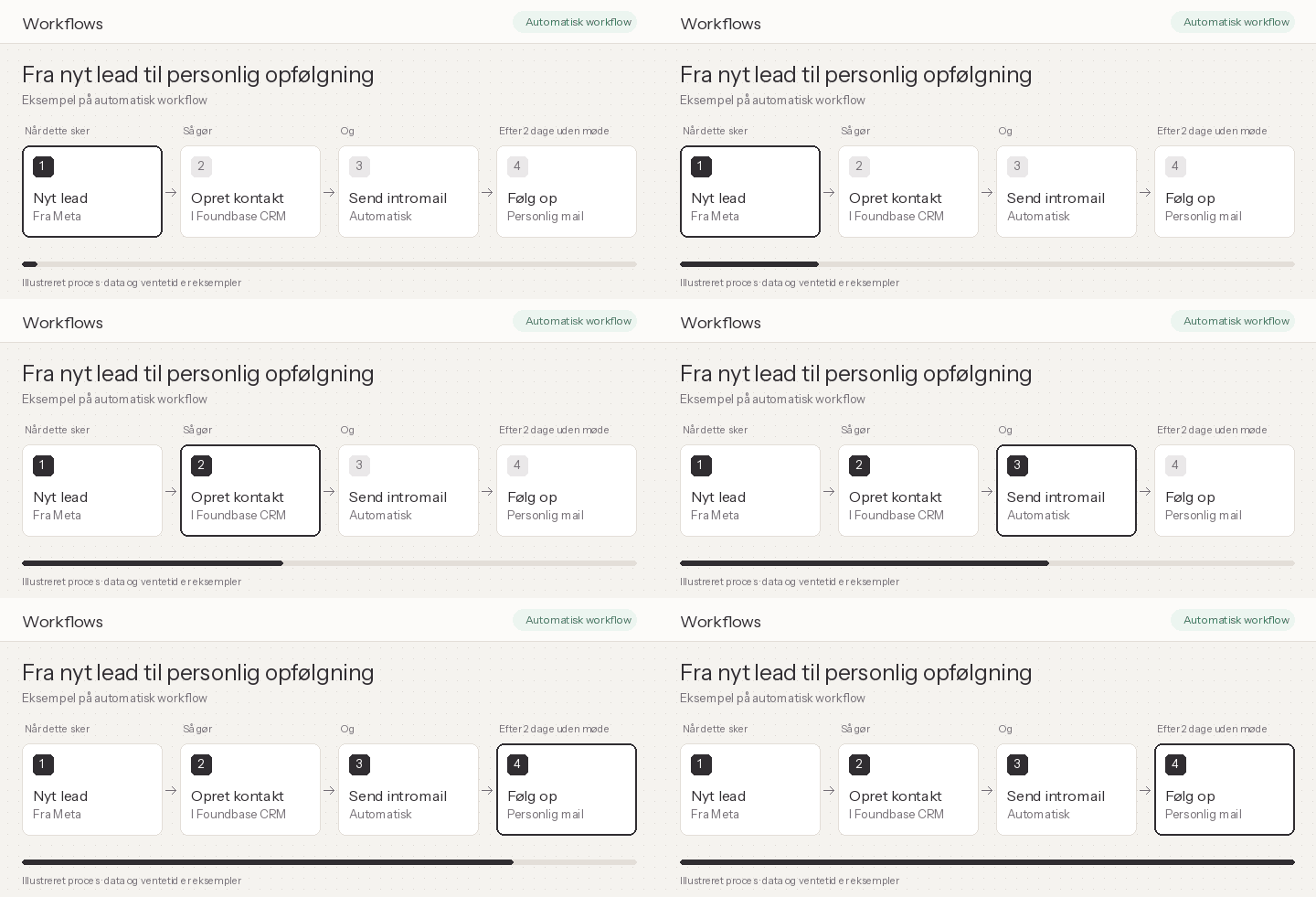
Illustrative workflow example. It shows one possible sequence, not a finished setup in any specific customer workspace.
Plan for exceptions: missing contact details, existing customers and enquiries needing a quick or special response. Make it visible who handles them. Good automation does not hide errors; it makes the remaining work clear.
If follow-up is the main issue, read more about CRM follow-up automation. That guide narrows in on the lead process; this article looks at choosing and introducing workflows across the business.
Two examples from small teams
A four-person consultancy
A small consultancy receives enquiries through a web form, email and referrals. Today, one person tracks them in an inbox while another keeps leads in a spreadsheet. The first step is not to send an automatic AI reply to everyone. The team brings active leads together, assigns one owner per enquiry and records the next action. Once that habit works, a stable trigger can create a task or internal notification for the owner. A person still decides whether a personal message fits the customer’s question.
The trade-off is faster assignment versus the risk of sending a generic or incorrect reply. Test task assignment first; automated email can wait. If the inbox is often the best source of context, check access and integration before promising that CRM receives every detail automatically.
A five-person agency
An agency usually signs an agreement, holds a kickoff meeting and assigns delivery work. Every new customer brings tasks, but they vary by project size. Start with a short onboarding checklist chosen by the project owner after the meeting. If the team finds that a few tasks always follow the same clear event, it can explore a workflow for that part, provided the trigger and action exist in the chosen setup. The project lead still handles the rest of onboarding.
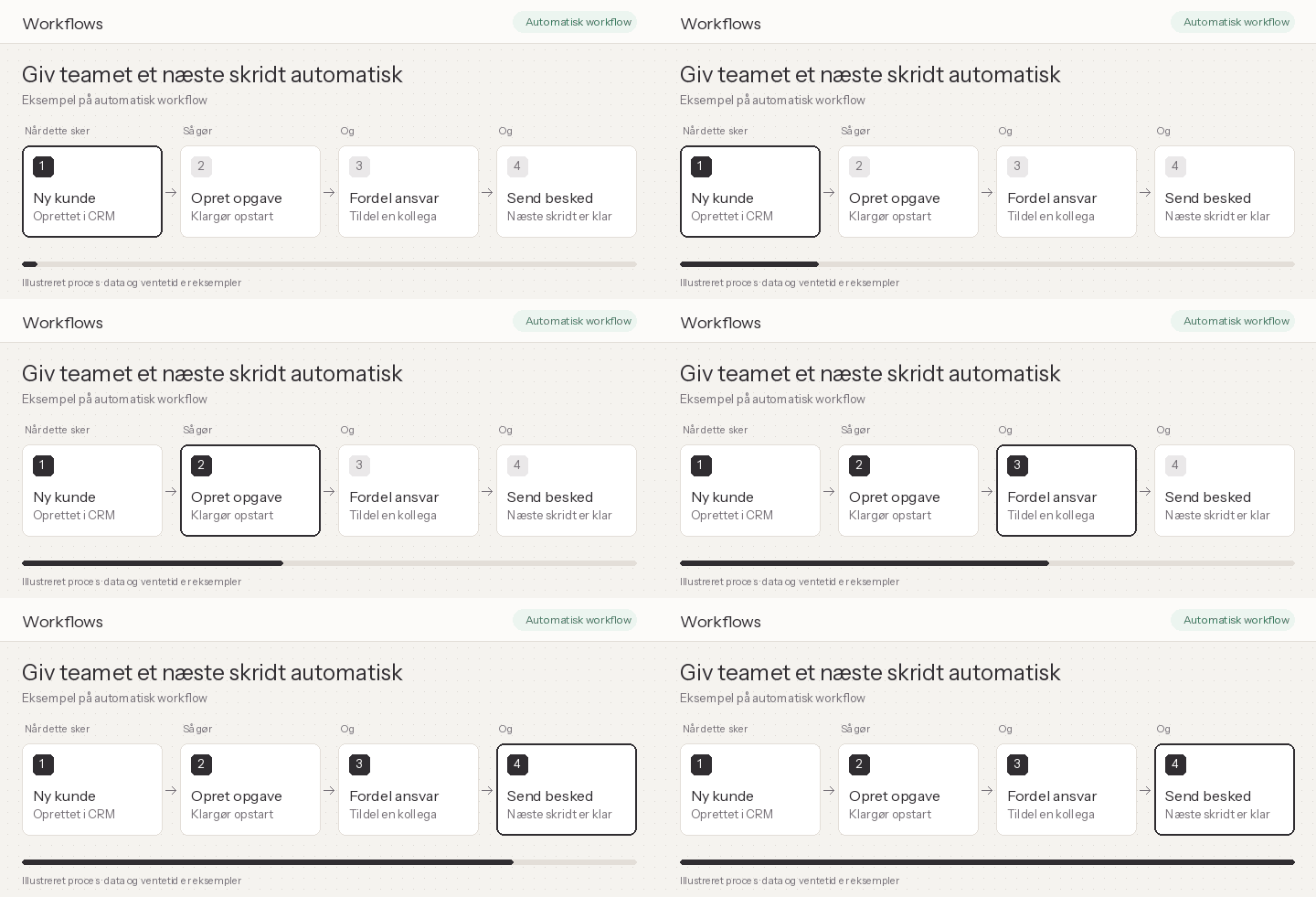
Illustration of a possible task flow. It is not a customer case or evidence of time saved by a particular team.
The trade-off is between a familiar onboarding process and individual delivery needs. Do not automate the entire project setup before the agency knows which details are always available and who approves scope and ownership.
Other workflows worth exploring
Possible examples vary from one business to another. Use these as questions about your own process, not promises that every system can perform every action:
Sales: after an agreed pipeline change, the owner gets a clear task or internal message.
Customer onboarding: once an agreement is signed, the team gets onboarding tasks.
Delivery: when a project reaches a milestone, the next owner and due date become visible.
Internal requests: a submitted form is categorized, then a person assigns the case.
Contracts: someone is notified that an agreement is waiting for review or signature.
Before building anything, check that the source system, integration and requested action are actually available. A logo on an integrations page does not mean a connection is active, and a workflow can only use the data and actions available in its setup.
How do you choose between AI, rules and integrations?
A tool does not solve a process problem by itself. First make a short list of the systems the process uses: where the enquiry comes in, where the customer or task is recorded, and where the team continues the work. Then note which data must move, who owns it and what action should happen.
Use an ordinary workflow rule if a known trigger and action solve the need directly. Consider an integration when two services need to share specific data and the connection supports the required access. Use AI when a step needs to understand or produce language, and include a review where a wrong interpretation could matter.
Some tasks need a combination. A form can start a rule, an integration can make contact details available, and AI can suggest a summary. The important thing is to understand failure paths: what happens when data does not arrive, a service is unavailable or AI produces an answer that does not fit?
Do not add more systems if an existing tool can handle the process simply. Compare the full setup, ownership and maintenance, not just the number of features in a product demo.
If your next step moves from a signed agreement to customer work, the contract flow guide can help clarify which steps belong to the agreement and which need human approval. If the challenge is moving data between systems, see CRM and project management integrations.
What workflow automation looks like in Foundbase
Foundbase has workflows where a team chooses a trigger, conditions and actions. The AI Assistant can help create a workflow draft from a description. Always review the draft, connections, fields and recipients before activating it.
Workflows and integrations require Foundbase Growth. You can start with manual CRM follow-ups and tasks if the process is not consistent yet; workflow automation is not a prerequisite for getting started. See Foundbase CRM and project management for the parts of the work that may sit alongside automation.
If a workflow starts in a customer conversation, CRM can help keep the contact, deal and next follow-up together. Check the specific feature and plan before deciding whether the task should be manual or automated.
A practical four-week rollout
A small pilot lets you learn without changing the entire business at once.
Week 1 — choose and measure: pick one recurring workflow. Write down the current steps, owner and exceptions. Note a simple baseline, such as manual hand-offs or how often the task is missed.
Week 2 — make the process consistent: clean up fields, ownership and status. Agree what a standard case looks like and who handles exceptions. Try the process manually with a few real cases.
Week 3 — build and review: create one automation with the required trigger, conditions and action. Use test data or a limited pilot where possible. Check what happens when information is missing or an event repeats.
Week 4 — evaluate: ask the people using the flow whether it removes repetition or creates more notifications. Compare against your baseline, adjust the automation or turn it off if it does not help.
The exact rollout can be shorter or longer. The point is to keep the test bounded, clarify ownership and preserve a path back to manual handling.
What does automation cost?
The cost is more than a software subscription. Include the time needed to clarify the process, configure rules, test exceptions and teach the team to use them. Integrations or AI features may also affect the plan and ongoing usage, depending on the tool. Compare the total work against the manual step you are trying to remove.
A small team can start by handling CRM and tasks manually in its existing tools before paying for workflow automation. In Foundbase, Automations and integrations require Growth; manual CRM follow-ups and tasks are one way to clarify the process before upgrading. Check the current workflow automation page, since terms and prices can change.
Measure whether the work improved, not only whether the workflow ran
A trigger firing only tells you that a rule ran. It does not tell you whether the customer got a correct response, the task was completed or the team saved effort. Choose an outcome tied to the original purpose: fewer missed follow-ups, less repeated data entry, shorter waits during a hand-off or fewer errors in one process.
Look for side effects too: more tasks than the team can complete, notifications nobody reads, incorrect records or a growing number of exceptions. If the outcome is unclear, stop before adding more rules. One simple measure the team understands is better than a dashboard full of numbers without a decision.
Avoid these workflow automation mistakes
Automating an unclear process: clarify ownership, status and exceptions first.
Starting with too many workflows: test one change at a time so you know what helped.
Using AI without review: have a person check facts, tone and recipient for important messages.
Forgetting data access: use only the information required and check who can see it.
Ignoring maintenance: assign an owner and revisit a workflow when the process or fields change.
Measuring activity instead of outcome: do not only count runs; check whether the work actually improved.
Automations that change customer records or trigger external actions should be explainable. Note what starts them, what they change, who owns them and how they are paused. That makes troubleshooting and handover easier.
Access, personal information and human approval
Before AI or a workflow gets access to information, narrow down which fields and accounts are necessary. Do not send an entire customer history if the task only needs a name, status and next action. Also check who can see the output and where it is stored.
Decide in advance which actions need a person. An internal draft or task reminder may be quick to review. An external message, a change to an agreement or another action with significant consequences should not happen only because a model or trigger said so. Put the approval into the process instead of relying on an informal expectation.
Plan for failure: who gets notified, how a mistaken action is corrected and whether the workflow can be paused without losing track of open cases. Try to answer those questions before the first automation is activated. This creates a practical safety boundary without making every small experiment cumbersome.
Make the workflow maintainable
Every workflow should have a named owner, a short explanation and a date for its next review. Revisit it when pipeline stages, responsibilities, fields or integrations change. Otherwise, a rule may continue creating tasks for an old process that nobody uses anymore.
Simple documentation can be three lines: “When X happens, the workflow does Y, unless Z. Owner is A. Pause it here.” Keep it close to the workflow or the team’s process notes. The goal is for a colleague to understand and take it over without asking the person who built it.
Checklist before turning an automation on
Is the trigger an event the team can recognize and control?
Have the conditions and actions been tested with realistic data?
Are the owner and exception process clear?
Should a person review the output before anything is sent or commits the business?
Does the workflow use only the necessary data, with appropriate access?
Does the team know how to pause, change or turn it off?
Have you chosen an outcome that shows whether it solves the original problem?
If the answer to any question is no, resolve it before activation. Start small, learn from real cases and expand only when it is clear what the automation does well.
Build one clear workflow at a time
AI and automation can help when they remove repetitive work without hiding ownership or exceptions. First map how the work happens, pick a stable process, then decide where rules, AI suggestions and human approval each fit. Measure whether the work improved and assign an owner to every workflow.
To see how workflows are built in Foundbase, read about workflow automation in Foundbase. For manual customer follow-up, take a look at Foundbase CRM. Compare the current workflow automation with the features you need.
Frequently asked questions
Workflow automation uses a defined trigger, optional conditions and actions. AI can help with language tasks such as summaries or suggestions, but review the output when it affects customers or important decisions.
Start with repeated, well-described processes with a clear owner, stable input and low risk. Handle exceptions separately.
Map one workflow, agree on ownership and exceptions, measure the current process, then pilot one automation with a clear way to pause it.
No. An ordinary rule is often more predictable when the trigger and action are fixed. Use AI when the task truly needs help understanding or producing language.
Foundbase has workflows with triggers, conditions and actions. The AI Assistant can help create a draft that the team reviews before activation. Workflows and integrations require Growth.
About Rasmus Rowbotham
Rasmus Rowbotham is the CEO and founder of Foundbase. He writes about CRM, project management, contracts and digital operations for small and mid-sized teams.
Get started
Give your team an assistant that knows the whole business
Start free in your own workspace, or explore a live demo with sample data first.
Try Foundbase free for 14 days
- No credit card required
- Then stay on Free with CRM and task management
- Or choose a plan with unlimited AI, contracts, e-signatures, budgets, integrations and automations
See Foundbase in a live demo
Explore a workspace with sample data right away, or book a call and we'll show you the assistant and what Foundbase can do for you.



Meet the team behind Foundbase
We're based in Odense